


A Fully Updated 2025 SPLK-2003 Exam Dumps - PDF Questions and Testing Engine
Easy Success Splunk SPLK-2003 Exam in First Try
To become a Splunk Phantom Certified Admin, individuals must pass the SPLK-2003 exam, which consists of 60 multiple-choice questions that must be completed within 90 minutes. SPLK-2003 exam covers topics such as Splunk Phantom architecture, installation and setup, workflows and playbooks, automation and orchestration, and integration with other tools and platforms. A passing score of 70% or higher is required to earn the certification, which is valid for two years. The Splunk Phantom Certified Admin certification demonstrates an individual's expertise in using Splunk Phantom to streamline security operations and improve incident response, making them a valuable asset to any organization looking to enhance their security posture.
NEW QUESTION # 38
Where can the Splunk App for SOAR Export be downloaded from?
- A. SOAR Community and GitHub.
- B. GitHub and Splunkbase.
- C. Splunk Answers and Splunkbase.
- D. Splunkbase and SOAR Community.
Answer: B
Explanation:
The Splunk App for SOAR Export can be downloaded from both GitHub and Splunkbase. Splunkbase is the official source for Splunk apps, where users can find, try, and download apps that enhance and extend the capabilities of Splunk, including the Splunk App for SOAR Export1. GitHub is also a common platform for sharing and collaborating on code, including Splunk apps and integrations. It is important to ensure that you are downloading from the official repository or author to avoid any security risks.
References:
Splunkbase, the official source for downloading the Splunk App for SOAR Export
NEW QUESTION # 39
Without customizing container status within Phantom, what are the three types of status for a container?
- A. New, In Progress, Closed
- B. Mew, Open, Resolved
- C. Low, Medium, High
- D. Low, Medium, Critical
Answer: A
Explanation:
Within Splunk SOAR, containers (which represent incidents, cases, or events) have a lifecycle that is tracked through their status. The default statuses available without any customization are
"New", "In Progress", and "Closed". These statuses help in organizing and managing the incident response process, allowing users to easily track the progress of investigations and responses from initial detection through to resolution.
NEW QUESTION # 40
Which of the following can be done with the System Health Display?
- A. Partially rewind processes, which is useful for debugging.
- B. View a single column of status for SOAR processes. For metrics, click Details.
- C. Reset DECIDED to reset playbook environments back to at-start conditions.
- D. Create a temporary, edited version of a process and test the results.
Answer: B
NEW QUESTION # 41
Which of the following can the format block be used for?
- A. To create text strings that merge state text with dynamic values for input or output.
- B. To generate arrays for input into other functions.
- C. To generate string parameters for automated action blocks.
- D. To generate HTML or CSS content for output in email messages, user prompts, or comments.
Answer: A
Explanation:
The format block in Splunk SOAR is utilized to construct text strings by merging static text with dynamic values, which can then be used for both input to other playbook blocks and output for reports, emails, or other forms of communication. This capability is essential for customizing messages, commands, or data processing tasks within a playbook, allowing for the dynamic insertion of variable data into predefined text templates.
This feature enhances the playbook's ability to present information clearly and to execute actions that require specific parameter formats.
NEW QUESTION # 42
Which of the following is an advantage of using the Visual Playbook Editor?
- A. Eliminates any need to use Python code.
- B. The Visual Playbook Editor is the only way to generate user prompts.
- C. Supports Python or Javascript.
- D. Easier playbook maintenance.
Answer: D
Explanation:
Visual Playbook Editor is a feature of Splunk SOAR that allows you to create, edit, and implement automated playbooks using visual building blocks and execution flow lanes, without having to write code. The Visual Playbook Editor automatically generates the code for you, which you can view and edit in the Code Editor if needed. The Visual Playbook Editor also supports Python and Javascript as scripting languages for custom code blocks. One of the advantages of using the Visual Playbook Editor is that it makes playbook maintenance easier, as you can quickly modify, test, and debug your playbooks using the graphical interface. Therefore, option D is the correct answer, as it states an advantage of using the Visual Playbook Editor. Option A is incorrect, because using the Visual Playbook Editor does not eliminate the need to use Python code, but rather simplifies the process of creating and editing code. You can still add custom Python code to your playbooks using the custom function block or the Code Editor. Option B is incorrect, because the Visual Playbook Editor is not the only way to generate user prompts, but rather one of the ways. You can also generate user prompts using the classic playbook editor or the Code Editor. Option C is incorrect, because supporting Python or Javascript is not an advantage of using the Visual Playbook Editor, but rather a feature of Splunk SOAR in general. You can use Python or Javascript in any of the playbook editors, not just the Visual Playbook Editor.
1: Web search results from search_web(query="Splunk SOAR Automation Developer Visual Playbook Editor")
NEW QUESTION # 43
Which of the following expressions will output debug information to the debug window in the Visual Playbook Editor?
- A. phantom.print ()
- B. phantom.assert()
- C. phantom.debug()
- D. phantom.exception()
Answer: C
Explanation:
The phantom.debug() function is used within Splunk SOAR playbooks to output debug information to the debug window in the Visual Playbook Editor. This function is instrumental in troubleshooting and developing playbooks, as it allows developers to print out variables, messages, or any relevant information that can help in understanding the flow of the playbook, the data being processed, and any issues that might arise during execution. This debugging tool is essential for ensuring that playbooks are functioning as intended and for diagnosing any problems that may occur.
NEW QUESTION # 44
What is enabled if the Logging option for a playbook's settings is enabled?
- A. More detailed information is available in the debug window.
- B. The playbook will write detailed execution information into the spawn.log.
- C. More detailed logging information Is available m the Investigation page.
- D. All modifications to the playbook will be written to the audit log.
Answer: A
Explanation:
Enabling the Logging option for a playbook's settings in Splunk SOAR enhances the level of detail provided in the debug window when the playbook is executed. This feature is particularly useful for development and troubleshooting purposes, as it allows playbook authors and analysts to see more granular information about how each action within the playbook operates, including inputs, outputs, and any errors or warnings. This detailed logging aids in identifying issues, understanding the playbook's flow, and optimizing performance.
NEW QUESTION # 45
During a second test of a playbook, a user receives an error that states: 'an empty parameters list was passed to phantom.act()." What does this indicate?
- A. The playbook debugger's scope is set to all.
- B. The container has artifacts not parameters.
- C. The playbook is using an incorrect container.
- D. The playbook debugger's scope is set to new.
Answer: D
Explanation:
Explanation
The correct answer is C because the error message indicates that the playbook debugger's scope is set to new.
The scope option determines which containers are used for debugging the playbook. If the scope is set to new, the debugger will only use containers that are created after the debugger is started. If the scope is set to all, the debugger will use all containers that match the playbook's filter criteria. The error message means that the debugger did not find any new containers with parameters to pass to the phantom.act() function. See Splunk SOAR Documentation for more details.
NEW QUESTION # 46
Which of the following is a step when configuring event forwarding from Splunk to Phantom?
- A. Map CIM to CEF fields.
- B. Create a Splunk alert that uses the event_forward.py script to send events to Phantom.
- C. Create a saved search that generates the JSON for the new container on Phantom.
- D. Map CEF to CIM fields.
Answer: B
Explanation:
Explanation
A step when configuring event forwarding from Splunk to Phantom is to create a Splunk alert that uses the event_forward.py script to send events to Phantom. This script will convert the Splunk events to CEF format and send them to Phantom as containers. The other options are not valid steps for event forwarding.
See Forwarding events from Splunk to Phantom for more details.
NEW QUESTION # 47
Which of the following can be configured in the ROl Settings?
- A. Time lost.
- B. Annual analyst salary.
- C. Number of full time employees (FTEs).
- D. Analyst hours per month.
Answer: B
Explanation:
In the ROI (Return on Investment) Settings within Splunk SOAR, one of the configurable parameters is the annual analyst salary. This setting is used to help quantify the cost savings and efficiency gains achieved through the use of SOAR in an organization's security operations. By factoring in the cost of analyst labor, organizations can better assess the financial impact of automating and streamlining security processes with SOAR, contributing to a comprehensive understanding of the solution's value.
NEW QUESTION # 48
Without customizing container status within Phantom, what are the three types of status for a container?
- A. New, In Progress, Closed
- B. Mew, Open, Resolved
- C. Low, Medium, High
- D. Low, Medium, Critical
Answer: A
Explanation:
Within Splunk SOAR, containers (which represent incidents, cases, or events) have a lifecycle that is tracked through their status. The default statuses available without any customization are "New", "In Progress", and
"Closed". These statuses help in organizing and managing the incident response process, allowing users to easily track the progress of investigations and responses from initial detection through to resolution.
NEW QUESTION # 49
When is using decision blocks most useful?
- A. When modifying downstream data hi one or more paths in the playbook.
- B. When selecting one (or zero) possible paths in the playbook.
- C. When evaluating complex, multi-value results or artifacts.
- D. When processing different data in parallel.
Answer: B
Explanation:
Explanation
Decision blocks are most useful when selecting one (or zero) possible paths in the playbook. Decision blocks allow the user to define one or more conditions based on action results, artifacts, or custom expressions, and execute the corresponding path if the condition is met. If none of the conditions are met, the playbook execution ends. Decision blocks are not used for processing different data in parallel, evaluating complex, multi-value results or artifacts, or modifying downstream data in one or more paths in the playbook. Reference, page 15.
NEW QUESTION # 50
In the SOAR main menu, there are sub-options below Sources. What is the purpose of these options?
- A. They permit analysts to select the app that is polled to create the containers.
- B. They filter the container list based on default or user-saved filters.
- C. They are only available for admins and would never be used by an analyst.
- D. They permit analysts to select cases related to an investigation.
Answer: B
NEW QUESTION # 51
What users are included in a new installation of SOAR?
- A. The admin and automation users are included by default.
- B. Only the admin user is included by default.
- C. The admin, power, and user users are included by default.
- D. No users are included by default.
Answer: A
Explanation:
In a new installation of Splunk SOAR, two default user accounts are typically created: admin and automation. The admin account is intended for system administration tasks, providing full access to all features and settings within the SOAR platform. The automation user is a special account used for automated processes and scripts that interact with the SOAR platform, often without requiring direct human intervention. This user has specific permissions that can be tailored for automated tasks.
NEW QUESTION # 52
When assigning an input parameter to an action while building a playbook, a user notices the artifact value they are looking for does not appear in the auto-populated list.
How is it possible to enter the unlisted artifact value?
- A. Edit the artifact to enable the List as Parameter option for the CEF value.
- B. Delete and recreate the artifact.
- C. Edit the container to allow CEF parameters.
- D. Type the CEF datapath in manually.
Answer: D
Explanation:
When building a playbook in Splunk SOAR, if the desired artifact value does not appear in the auto-populated list of input parameters for an action, users have the option to manually enter the Common Event Format (CEF) datapath for that value. This allows for greater flexibility and customization in playbook design, ensuring that specific data points can be targeted even if they're not immediately visible in the interface. This manual entry of CEF datapaths allows users to directly reference the necessary data within artifacts, bypassing limitations of the auto-populated list. Options B, C, and D suggest alternative methods that are not typically used for this purpose, making option A the correct and most direct approach to entering an unlisted artifact value in a playbook action.
When assigning an input parameter to an action while building a playbook, a user can use the auto-populated list of artifact values that match the expected data type for the parameter. The auto-populated list is based on the contains parameter of the action inputs and outputs, which enables contextual actions in the SOAR user interface. However, the auto-populated list may not include all the possible artifact values that can be used as parameters, especially if the artifact values are nested or have uncommon data types. In that case, the user can type the CEF datapath in manually, using the syntax artifact.<field>.<key>, where field is the name of the artifact field, such as cef, and key is the name of the subfield within the artifact field, such as sourceAddress.
Typing the CEF datapath in manually allows the user to enter the unlisted artifact value as an input parameter to the action. Therefore, option A is the correct answer, as it states how it is possible to enter the unlisted artifact value. Option B is incorrect, because deleting and recreating the artifact is not a way to enter the unlisted artifact value, but rather a way to lose the existing artifact data. Option C is incorrect, because editing the artifact to enable the List as Parameter option for the CEF value is not a way to enter the unlisted artifact value, but rather a way to make the artifact value appear in the auto-populated list. Option D is incorrect, because editing the container to allow CEF parameters is not a way to enter the unlisted artifact value, but rather a way to modify the container properties, which are not related to the action parameters.
1: Web search results from search_web(query="Splunk SOAR Automation Developer input parameter to an action")
NEW QUESTION # 53
If no data matches any filter conditions, what is the next block run by the playbook?
- A. The end block.
- B. The next block.
- C. The start block.
- D. The filter block.
Answer: B
Explanation:
In a Splunk SOAR playbook, if no data matches the conditions specified within a filter block, the playbook execution will proceed to the next block that is configured to follow the filter block. The "next block" refers to whatever action or decision block is designed to be next in the sequence according to the playbook's logic.
Filters in Splunk SOAR are used to make decisions based on data conditions, and they control the flow of the playbook. If the conditions in a filter block are not met, the playbook does not simply end or restart; rather, it continues to execute the subsequent blocks that have been set up to handle situations where the filter conditions are not met.
A filter block will typically have different paths for different outcomes-matching and non-matching. If the conditions are matched, one set of blocks will execute, and if not, another set of blocks, which could simply be the next one in the sequence, will execute. This allows for complex logic and branching within the playbook to handle a wide range of scenarios.
In a Splunk SOAR playbook, when no data matches any filter conditions, the playbook continues to run by proceeding to the next block in the sequence. The filter block is designed to specify a subset of artifacts before further processing, and only artifacts matching the specified condition are passed along to downstream blocks for processing1. If no artifacts meet the conditions, the playbook does not end or restart; instead, it moves on to the next block, which could be any type of block depending on the playbook's design1.
References:
Use filters in your Splunk SOAR (Cloud) playbook to specify a subset of artifacts before further processing - Splunk Documentation
NEW QUESTION # 54
Which app allows a user to run Splunk queries from within Phantom?
- A. The Integrated Splunk/Phantom app.
- B. Splunk App for Phantom Reporting.
- C. Splunk App for Phantom?
- D. Phantom App for Splunk.
Answer: D
Explanation:
Explanation
The Phantom App for Splunk allows a user to run Splunk queries from within Phantom. This app provides actions such as run query, ingest events, and save search, which enable the user to interact with Splunk from Phantom playbooks or the Phantom UI. The other apps are not relevant for this use case. The Splunk App for Phantom is used to send data from Splunk to Phantom. The Integrated Splunk/Phantom app is a deprecated app that was replaced by the Splunk App for Phantom. The Splunk App for Phantom Reporting is used to generate reports on Phantom activity from Splunk. Reference, page 1.
NEW QUESTION # 55
After enabling multi-tenancy, which of the Mowing is the first configuration step?
- A. Change the tenant permissions.
- B. Select the associated tenant artifacts.
- C. Set default tenant base address.
- D. Configure the default tenant.
Answer: D
Explanation:
Explanation
The correct answer is D because the first configuration step after enabling multi-tenancy is to configure the default tenant. Multi-tenancy is a feature that allows you to create multiple logical partitions of Phantom data and assets for different groups of users. The default tenant is the tenant that is created when Phantom is installed and contains all the existing data and assets. You need to configure the default tenant's name, description, base address, and logo before creating other tenants. See Splunk SOAR Documentation for more details.
NEW QUESTION # 56
In this image, which container fields are searched for the text "Malware"?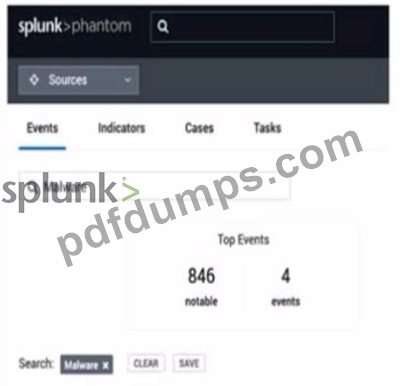
- A. Event Name or ID.
- B. Event Name, Notes, Comments.
- C. Event Name and Artifact Names.
Answer: C
Explanation:
The image shows a user interface of "splunk>phantom" with a search bar at the top, where a search for
"Malware" has been initiated. The tabs labeled "Events," "Indicators," "Cases," and "Tasks" suggest that the search functionality could span across various container fields within the Splunk SOAR environment.
Typically, the search would include fields that are most relevant to the user's query, which in this case, are likely to be the Event Name and Artifact Names. These fields are central to identifying and categorizing events and artifacts within Splunk SOAR, making them primary targets for a search term like "Malware" which is commonly associated with security events and indicators17.
References:
* Understanding containers - Splunk Documentation
NEW QUESTION # 57
What are the differences between cases and events?
- A. Cases: contain a collection of containers.
Events: contain potential threats. - B. Cases: incidents with a known violation and a plan for correction.
Events: occurrences in the system that may require a response. - C. Case: potential threats.
Events: identified as a specific kind of problem and need a structured approach. - D. Cases: only include high-level incident artifacts.
Events: only include low-level incident artifacts.
Answer: B
Explanation:
Cases and events are two types of containers in Phantom. Cases are incidents with a known violation and a plan for correction, such as a malware infection, a phishing attack, or a data breach. Events are occurrences in the system that may require a response, such as an alert, a log entry, or an email. Cases and events can contain both high-level and low-level incident artifacts, such as IP addresses, URLs, files, or users. Cases do not contain a collection of containers, but rather a collection of artifacts, tasks, notes, and comments. Events are not necessarily potential threats, but rather indicators of potential threats. In the context of Splunk Phantom, cases and events serve different purposes. Cases are structured to manage and respond to incidents with known violations and typically have a plan for correction. They often involve a coordinated response and may include various artifacts, notes, tasks, and evidence that need to be managed collectively. Events, on the other hand, are occurrences or alerts within the system that may require a response. They can be considered as individual pieces of information or incidents that may be part of a larger case. Events are the building blocks that can be aggregated into cases if they are related and require a consolidated approach to incident response and investigation.
NEW QUESTION # 58
A user has written a playbook that calls three other playbooks, one after the other. The user notices that the second playbook starts executing before the first one completes. What is the cause of this behavior?
- A. The steep option for the second playbook is not set to a long enough interval.
- B. Synchronous execution has not been configured.
- C. The first playbook is performing poorly.
- D. Incorrect Join configuration on the second playbook.
Answer: B
Explanation:
Synchronous execution has not been configured. Synchronous execution is a feature that allows you to control the order of execution of playbook blocks. By default, Phantom executes playbook blocks asynchronously, meaning that it does not wait for one block to finish before starting the next one. This can cause problems when you have dependencies between blocks or when you call other playbooks. To enable synchronous execution, you need to use the sync action in the run playbook block and specify the name of the next block to run after the called playbook completes.
In Splunk SOAR, playbooks can be executed either synchronously or asynchronously.
Synchronous execution ensures that a playbook waits for a called playbook to complete before proceeding to the next step. If the second playbook starts executing before the first one completes, it indicates that synchronous execution was not configured for the playbooks. Without synchronous execution, playbooks will execute independently of each other's completion status, leading to potential overlaps in execution. This behavior can be controlled by properly configuring the playbook execution settings to ensure that dependent playbooks complete their tasks in the desired order.
NEW QUESTION # 59
......
Splunk SPLK-2003 (Splunk Phantom Certified Admin) certification exam is designed for individuals who want to validate their skills and knowledge in the administration of the Splunk Phantom platform. Splunk Phantom Certified Admin certification is ideal for IT professionals who are responsible for managing and supporting Splunk Phantom deployments, including security analysts, incident responders, and system administrators.
The SPLK-2003 exam is a 90-minute test consisting of 60 multiple-choice questions. Candidates must score at least 70% to pass the exam and earn their certification. SPLK-2003 exam can be taken either online or at a testing center, and candidates have the option to retake the exam if they do not pass on their first attempt.
SPLK-2003 Study Material, Preparation Guide and PDF Download: https://actualtorrent.pdfdumps.com/SPLK-2003-valid-exam.html